


OpenText Livelink / Content Server to SharePoint Migration
Proven Step by Step Method to Accurately Move Livelink and Content Server Content to SharePoint and SharePoint Online
Syntergy’s Proven Methodolgy Provides an Accurate Step by Step Process to Migrate Livelink / Content Server ECM Data to SharePoint™. The steps are:
Read More- Analyze Livelink / Content Server and determine a migration plan, based on the data and business requirements. This is mainly covered in an initial proof of concept; overall the migration plan should integrate with the overall deployment which includes provisioning the hardware and a full taxonomy/user/group definition and communication plan. Syntergy will review and provide comments and tasks to your master plan.
- Set up a SharePoint environment with the applicable business requirements and taxonomy. This includes the site structure, permission model, users and groups, and metadata requirements. You can use the information from the Livelink / Content Server analysis and some sample extractions to determine the detailed needs. At this point, you have an empty SharePoint system with the sites created for each organizational unit and applicable users.
- Migrate the data, including enterprise data, personal data, and projects. In each case, the target is a site in SharePoint with the creation of document libraries, task lists, or discussions as needed in the existing site.

Syntergy Uses a Proven Set of Custom Migration Tools to Insure Success. The tools are:
This Livelink / Content Server module provides information about the Livelink / Content Server environment. This information is used to scope a migration by identifying key areas that may require manual intervention (i.e. permission and path depths).
This Livelink / Content Server module extracts data from Livelink / Content Server to the file system with all of the metadata information. Features include the ability to select the versions with a cutoff date or total number of versions as well as exporting the metadata only and selecting the specific area to export.
This utility is a windows application that can be run on the user's desktop or SharePoint web front end server. It provides a graphical user interface to map folders to document libraries, or to specific sites. It visualizes any permission issues and allows the permissions to be either changed, or the data to be mapped to another document library or site.
The Connect Bulk Loader Extensions consists of a SharePoint solution that will be installed on the SharePoint farm. The solution deploys a web service that will be utilized for the import process. Connect for Sharelink leverages this web service to import all data and set the appropriate metadata values. In addition, it supports adding users/groups to sites, creating content types and columns, creating list columns, etc.
Livelink / Content Server to SharePoint Migration
The Migration Tools are the Key
Extracting the data. You can extract data from Livelink / Content Server using the Sharelink Livelink / Content Server Exporter module. This lets you select an area in Livelink / Content Server and extract the documents to a staging area. The staging area needs sufficient disk space to hold the extracted data and metadata information stored in xml file format. This staging area needs to be accessible from the Livelink / Content Server Admin server and the desktop that Connect for Sharelink is isntalled on.
Mapping the data – Connect for Sharelink lets you visualize the permission issues and make decisions. The .xml file from the extraction process also has the information that you can modify to create reports to help end users make decisions. You also need to decide about ownership for users that are no longer in the system and the reorganization of data or groups. Connect for Sharelink lets you change permissions, either by inheriting the permissions or moving the data to a new document library or site. You can then use the Connect for Sharelink to select the target sites in SharePoint for the data.
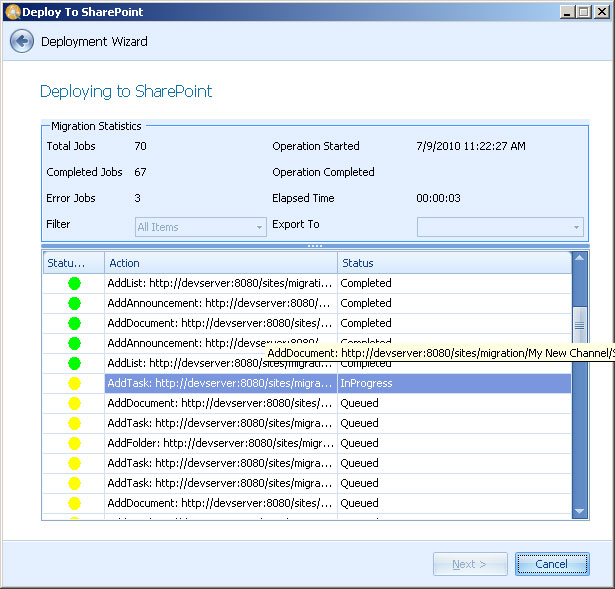
Importing the data – When the data is properly mapped to SharePoint, the Connect for Sharelink’s deployment wizard will guide users through the process on importing the data. Statistics and logging are available to tracking the progress of the importer data

Key Benefits
Why Teams love Sharelink
Syntergy has developed a proven migration methodology and a set of tools that insure a successful migration
Syntergy migration consultants have deep experience with Livelink / Content Server technologies and SharePoint migrations and will ensure that the most common pitfalls during migration are avoided.
There is no need for custom Livelink / Content Server programming
There is no need to develop .NET applications for SharePoint
The is no need to write bulk loading capabilities for SharePoint
Quick turnaround on the migration. For example, Syntergy consultants can quickly perform manual manipulations of the metadata files for the more complex migrations
Lower risk in using proven technologies because issues that come up during the migration can be dealt with quickly
Do You...
- Want to accurately move Livelink / Content Server™ ECM content to SharePoint™?
- Need to map your Livelink / Content Server™ ECM content to SharePoint™ to insure all data is moved correctly?
- Want existing Livelink / Content Server™ ECM users to be successful when they switch to SharePoint™?
- Want to save time and money by using a proven, successful approach to migrating Livelink / Content Server™ ECM content?
- Want to accurately move Livelink/Content Server™ ECM content to SharePoint?
If yes, ShareLink is for you.

Specifications
Component | Requirement |
|---|---|
Browsers | All standard browsers |
Helpful Resources at Your Fingertips
Access product guides, datasheets, and demo videos to get the most out of your Syntergy tools—all in one place.
Need help finding a resource?


Get a free trial
Please submit the form below to request a free trial.

Hear from Our Clients
"We appreciate how responsive you, Robbie, and the team have been to our various requests and how flexible you have been with resourcing to support our program."
— Ovintiv