


Auto Numbering
Sequentially Number Documents as they are Added to Livelink
Number Documents Quickly, Accurately and Inexpensively
Creating consistently numbered documents is extremely helpful for the access and easy retrieval of the right information.
Useful Data Identification and Organization Tool
Having documents consistently numbered is critical in most regulated environments.

Auto Numbering for Content Server
Documents can be added and auto numbered with this module through the Content Server interface, Livelink Explorer®, or programmatically using LAPI.
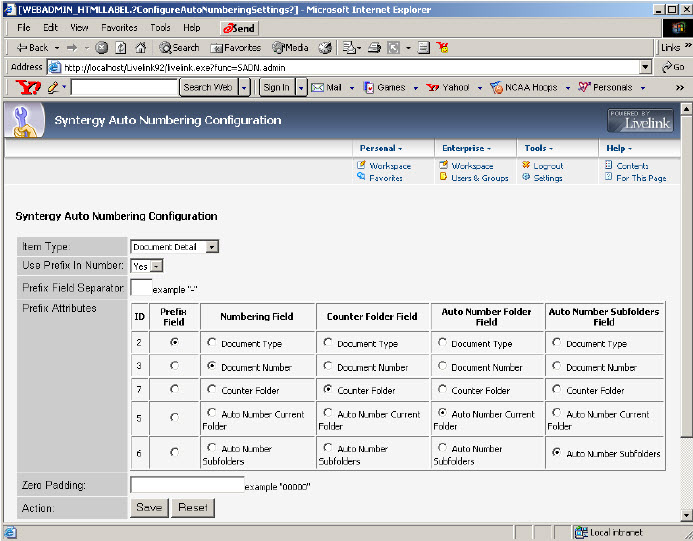
Assigning the appropriate category to a folder enables the document auto-numbering module. The Auto Numbering module contains an administration page where the specific category is defined.
The Auto Numbering configuration page also allows the user to identify which field will contain the auto-generated document number.
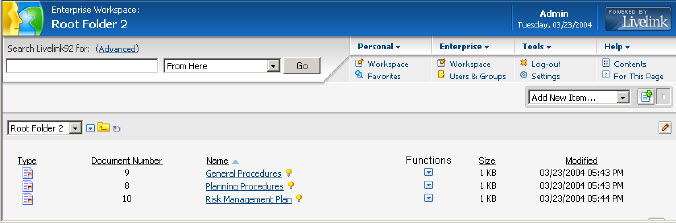
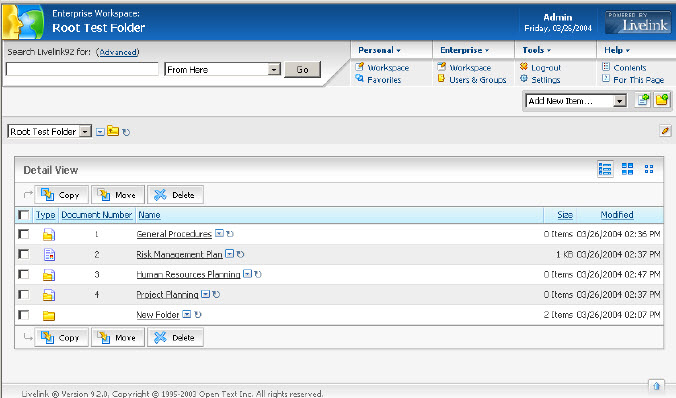
Once a folder that will contain auto numbering is created, documents can be added as needed and the Auto Numbering module will handle the document numbering. Go to the folder browse page to see the auto numbers displayed. To disable document numbering for a document or folder, simply remove the selected Category.
Key Benefits
Why Teams love Auto Numbering
Auto numbers are displayed in the folder browse page.
When moving or copying a file, the document gets a new sequence number from the target folder.
Documents in a folder can be sorted by their sequence number.
The user can choose to keep the original categories in the move/copy page and the document will not get a new sequence number.
Do You...
- Want to automatically add sequence numbers to documents when adding them to specific folders?
- Need to sort Content Server documents in a folder by their sequence number?
- Want to copy or move files and have them get a new sequence number from the target folder?
If yes, Auto Numbering is for you.

Specifications
Component | Requirement |
|---|---|
Browsers | All standard browsers |
Helpful Resources at Your Fingertips
Access product guides, datasheets, and demo videos to get the most out of your Syntergy tools—all in one place.
Need help finding a resource?


Hear from Our Clients
"We appreciate how responsive you, Robbie, and the team have been to our various requests and how flexible you have been with resourcing to support our program."
— Ovintiv